
Comparison
LLM Benchmarks: A Practical Framework for Product Teams
How to compare AI model outputs in a way that is repeatable, product-relevant, and more useful than generic benchmark tables.
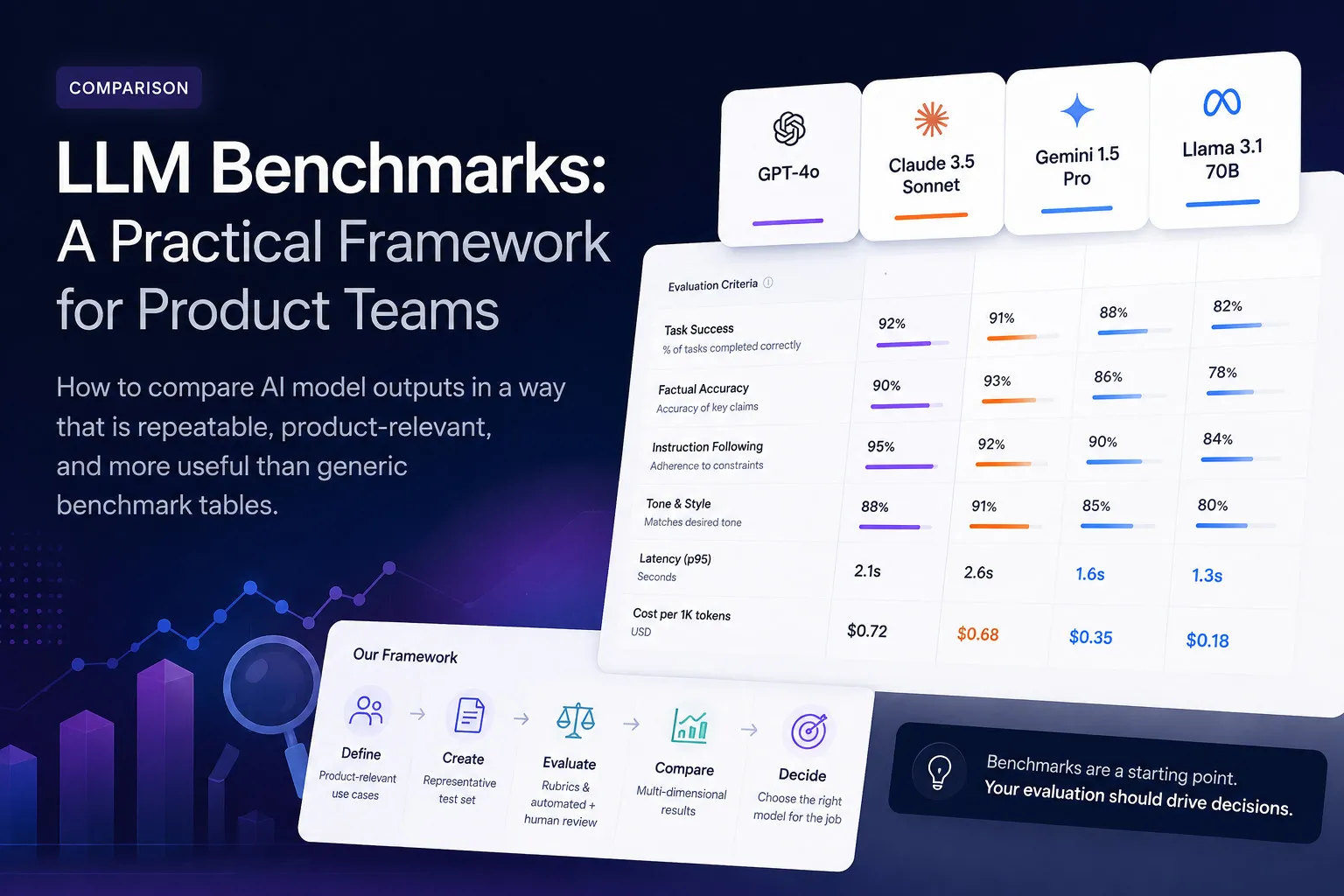
Most LLM benchmarks tell you how models perform on academic tasks — math problems, trivia questions, coding challenges. That's useful if you're evaluating a model's general capability, but it's not what product teams need. What you care about is: does this model produce better outputs for my specific use case?
Why Generic LLM Benchmarks Aren't Enough for Product Teams
Generic benchmarks like MMLU, HumanEval, and GSM8K measure a model's ability on predefined academic tasks. They don't account for:
- Your specific domain — Medical, legal, technical, casual — with its own vocabulary and requirements
- Your output format — Summaries, extractions, classifications — not just "correct" answers
- Your users' tolerance for style — Tone, length, formality
- Your cost and latency constraints — A benchmark winner might be too slow or expensive
Product teams need product-relevant benchmarks — evaluations that measure what actually matters for their users and their release criteria.
What an AI Model Comparison Should Measure
When comparing models for a product feature, measure across dimensions that affect user experience and business outcomes:
Output Quality
Use structured scoring (faithfulness, actionability, completeness, hallucination) to measure output quality consistently across models.
Latency
How long does it take to generate an output? On-device models (Apple FM) are typically <50ms; cloud APIs range from 500ms to several seconds.
Cost
API costs per token vary dramatically: Apple Foundation Models are free, while GPT-4o runs $5-15/M tokens. At scale, this matters.
Privacy
Does user data leave the device? On-device models never send data to the cloud — critical for health, finance, and personal data.
Repeatability
Does the model produce consistent outputs for the same input? Lower temperature means more repeatability; important for reproducible evaluation.
Deployment Fit
Can the model run where your users are? Apple Foundation Models require macOS 26+ and Apple Silicon. Cloud APIs work anywhere.
To understand how to score output quality, read our four scoring metrics breakdown.
How to Compare Outputs Using the Same Dataset and Scoring Guide
The key to a fair model comparison: keep everything constant except the model. Run the same dataset through all models you want to compare, using the same prompt and generation config, and score with the same judge.
Steps:
- Build or import a representative dataset for your use case
- Define a prompt template that all models will use
- Set the same generation config (temperature, max tokens) across models
- Run evaluation with each model as the generator
- Use the same judge provider and scoring guide to score all outputs
- Compare aggregate scores in the leaderboard
Create your first evaluation test to see this workflow in action.
Local vs Cloud Model Tradeoffs
The choice between local (on-device) and cloud models affects every dimension above:
| Dimension | Apple Foundation Models | Cloud LLMs (GPT, Claude) |
|---|---|---|
| Quality | Moderate (~3B params) | High (70B-1T+ params) |
| Latency | <50ms | 500ms-4s |
| Cost | Free | $0.20-$15/M tokens |
| Privacy | 100% on-device | Data leaves device |
| Offline | Yes | No |
| Context window | 4,096 tokens | Up to 200K tokens |
For a detailed comparison, see our Apple Foundation Models vs cloud LLMs guide.
Apple Foundation Models vs External Providers
When evaluating Apple Foundation Models against cloud providers, use the same methodology: identical dataset, identical prompt, identical scoring guide. The only variable should be the generation model.
This gives you a clean apples-to-apples comparison of output quality. In our testing, Apple Foundation Models perform well for summarization and extraction tasks — competitive with cloud models on faithfulness and hallucination, though sometimes lower on actionability for complex tasks.
See the full setup in our guide to evaluating Apple Foundation Models on macOS.
How to Track Results in a Leaderboard
LLM Eval Suite's leaderboard tracks evaluation results across variants and runs. For model comparison, name your variants after the model/configuration combination:
- Apple FM + v1 prompt
- GPT-4o + v1 prompt
- Claude Sonnet + v1 prompt
Run evaluation for each, then compare overall scores and per-metric breakdowns. The leaderboard shows which configuration wins on your specific dataset — not just on generic benchmarks.
How to Use LLM Eval Suite for Model Comparison
LLM Eval Suite supports comparing Apple Foundation Models against cloud LLMs in the same evaluation run:
- Import your evaluation dataset
- Create variants — one for each model you want to compare
- Set each variant's generation provider to the model you're testing
- Run with the same judge and scoring guide for all variants
- Review results in the leaderboard to see which model wins
See the step-by-step workflow in our first test guide.
Get Started
Ready to run your own model comparison? Create your first evaluation test with LLM Eval Suite, or compare Apple Foundation Models vs cloud LLMs in more detail.
Try LLM Eval Suite
Download from the Mac App Store and start comparing AI models with structured evaluation.
Download on Mac App Store